
How to Set Up Resources in GCP with Terraform
- Anand Nerurkar
- Jul 5, 2022
- 2 min read

Assumption :
GCP Free Tier Account
Terraform is installed
Additional Resource
Terraform documentation for scripting
We will set up below resources in GCP with terraform.
· VPC -my-vpc-nw-anand
· Custom-network
o Subnet1 – subnet1-us-central1
o CIDR 10.2.0.0/29
o Subnet2 - subnet1-us-central2
o CIDR 10.3.0.0/29
· VM instane in custom network
o Name : my-vm-1,my-vm-2
· Vm instance in default network
o Name : vm-default-subnet
· Firewall rule for custom network
o Name : default-allow-ssh
Below steps are followed
1. create a service account and give editor role to the service account
a. goto IAM -service account-create service account and assign editor role.

2. download the key associated with the service account, put service account key in terraform lab folder and give the respective path in main.tf file
a. got to your service account-manage key-add key -json. This will download key and copy that key into your terraform folder , mention this path in main.tf
service account key location= C:\\data\\terraform_lab\\retail-project-1405-b5d0f3a53aa7.json
credentials = file("C:\\data\\terraform_lab\\retail-project-1405-b5d0f3a53aa7.json")

3. define below entry in main.tf indicating cloud provider and account key path as below
==============main.tf===================
provider "google" {
project = "retail-project-1405"
credentials = file("C:\\data\\terraform_lab\\retail-project-1405-b5d0f3a53aa7.json")
}
======================================
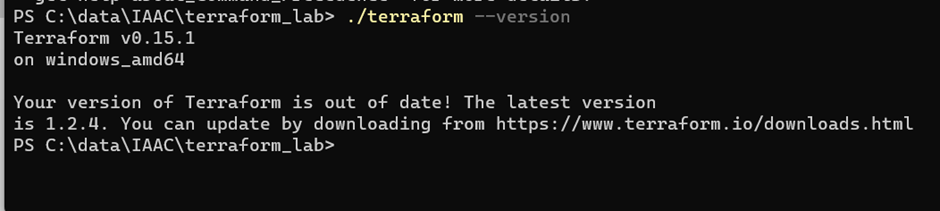
4. got to terraform location, open terminal and check it works by executing command terraform --version
5. Execute terraform init

6. create custom-network terraform file and execute terraform plan on terminal
============custom-network.tf==========================
#custom network
resource "google_compute_network" "custom-network" {
name = "my-vpc-nw-anand"
auto_create_subnetworks = false
mtu = 1450
}
#custom network with subnetwork
resource "google_compute_subnetwork" "custom_subnetwork_us_central-1" {
name = "subnet1-us-central1"
ip_cidr_range = "10.2.0.0/29"
region = "us-central1"
network = google_compute_network.custom-network.id
}
#custom network with subnetwork
resource "google_compute_subnetwork" "custom_subnetwork_us_central-2" {
name = "subnet2-us-central1"
ip_cidr_range = "10.3.0.0/29"
region = "us-central1"
network = google_compute_network.custom-network.id
}
=====================================================

7. enter terraform apply

Once command executed, pls check in GCP console , resources my-vpc and subnet is created.

8. Create vm-creation.tf- will create vm instance in subnet1,subnet2 and enter terraform plan, then terraform apply command.
=================vm-creation.tf==========================
#virtual machine creation in subnet1
resource "google_compute_instance" "VM-1" {
name = "my-vm-1"
machine_type = "f1-micro"
zone = "us-central1-a"
boot_disk {
initialize_params {
image = "ubuntu-os-cloud/ubuntu-1804-lts"
}
}
network_interface {
network = google_compute_network.custom-network.id
subnetwork = google_compute_subnetwork.custom_subnetwork_us_central-1.id
}
}
#virtual machine creation in subnet2
resource "google_compute_instance" "VM-2" {
name = "my-vm-2"
machine_type = "f1-micro"
zone = "us-central1-a"
boot_disk {
initialize_params {
image = "ubuntu-os-cloud/ubuntu-1804-lts"
}
}
network_interface {
network = google_compute_network.custom-network.id
subnetwork = google_compute_subnetwork.custom_subnetwork_us_central-2.id
}
}
========================================

9. Create VM instance in default network and execute terraform plan & apply
=======================vm-creation-default-nw===========
#Instance creation in default network
resource "google_compute_instance" "vm-deault-subnet" {
name = "vm-deault-subnet"
machine_type = "f1-micro"
zone = "us-central1-a"
boot_disk {
initialize_params {
image = "ubuntu-os-cloud/ubuntu-1804-lts"
}
}
network_interface {
network = "default"
}
}

10. Create firewall rule for custom network and execute terraform plan and apply step
===============firewall-rule.tf=====================
#firewall creation for cusotm network
resource "google_compute_firewall" "allow-ssh" {
name = "my-custom-firewall-rule"
network = google_compute_network.custom-network.id
source_ranges = ["0.0.0.0/0"]
allow {
protocol = "tcp"
ports = ["22"]
}
}

Conclusion : Thus we have provisioned below resources successfully
· custom-network: my-vpc-nw-anand
· subnet1 in custom network
o name: subnet1-us-central1
o cidr : 10.2.0.0/29
· subnet2 in custom network
o name: subnet2-us-central2
o cidr: 10.3.0.0/29
· VM creation in custom subnet1
o Name : my-vm-1
o Zone : us-central1-a
· VM creation in custom subnet2
o Name : my-vm-2
o Zone : us-central1-a
· Firewall rule for custom network
o Name: default-allow-ssh
We can apply terraform destroy command to clean up the resources.
Our terraform template is ready and can be reused to create/clean up the resources in GCP.
Thus we are utilizing Terraform scripting as IAAC tool to automate for creation/clean up the resources in GCP.


Comments