
How To Create Fullstack React App + Spring Rest API Integration
- Anand Nerurkar
- Jul 29, 2023
- 4 min read

Updated: Sep 7, 2023
What we will build
We will build a full-stack web application - basic Employee Management Application with CRUD features:
Create Employee
List Employee
Update Employee
Delete Employee
Quick overview of React and Spring Boot
What is React JS
React is used to build user interfaces (UI) on the front end.
React is not a framework (unlike Angular, which is more opinionated).
React is an open-source project created by Facebook.
What is Spring Boot
Spring boot to develop REST web services and microservices.
Spring Boot has taken the Spring framework to the next level. It has drastically reduced the configuration and setup time required for spring projects.
You can set up a project with almost zero configuration and start building the things that actually matter to your application.
Source Code GitHub
React App Source Code https://github.com/anerurkar/react-frontend
Employee Resource Endpoint https://github.com/anerurkar/employee-backend-service
Assumption:
Node JS ,NPM installed
Bootstrap installed
React Snippet is installed in VS code
React App Source Code https://github.com/anerurkar/react-frontend
Available Employee Resource https://github.com/anerurkar/employee-backend-service

React + Springboot Rest API -Architecture

To create React App
Execute command -
npx create-react-app react-frontend
This command will create react application layout with all required dependency and library.
React Application Structure

package.json

node_modules
This folder is created when you create react app. it contains all dependent modules
public/index.html
This is SPA, so only index.html fill will be served when we start application. This index.html file contain div element with id as root. This will load App.js ->this js file make use of ReactDOM.render method to render App. This App is then then rendered in root element of index.html.

src:
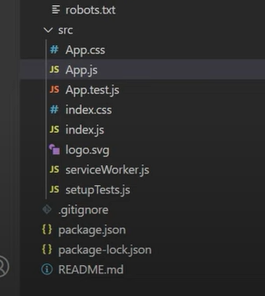
src/App.js
function based (JSX) react component. App.js is root component which is rendered in index.html

To run app
npm start
hit http://localhost:3000 in browser

Edit App.js, remove all parts from header section, simply put hello world

This will refresh page

To integrate bootstrap4
There are 2 ways we can integrate
using bottstrap cdn link

copy above url and paste it in index.html -header -title section as below

2. npm install bootstrap --save
This will add entry into package.json
Before adding entry into package.json

After adding entry into package.json

import bootstrap into index.js

To create List Employee React Component
Goto src folder-create folder component - create ListEmployeeComponent.jsx
Inside ListEmployeeComponent.jsx, we will make use of React Snippet utility. For this, simple type rcc and enter , it will create template for this file as below


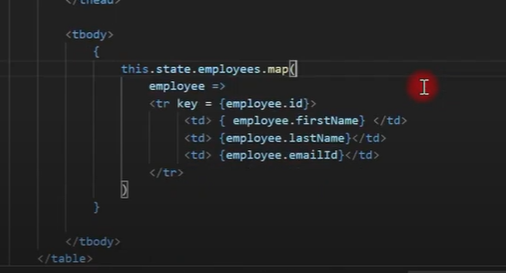
Edit app.js as below


To integrate REST API call into React
we will use AXIOS http library to give a call to rest api endpoint
For this , we need to first install axios library to react app
npm install axios --save --- this will add entry into package.json

goto src/create services folder, create EmployeeService.js
services/EmployeeService.js

Goto ListEmplpoyeeComponent.jsx and use componenet life cycle method componentDidMount()


create component/HeaderComponent.jsx as below

update render method as below

create component/FooterComponent.jsx

update render method

Edit App.js and inclide header and footer component

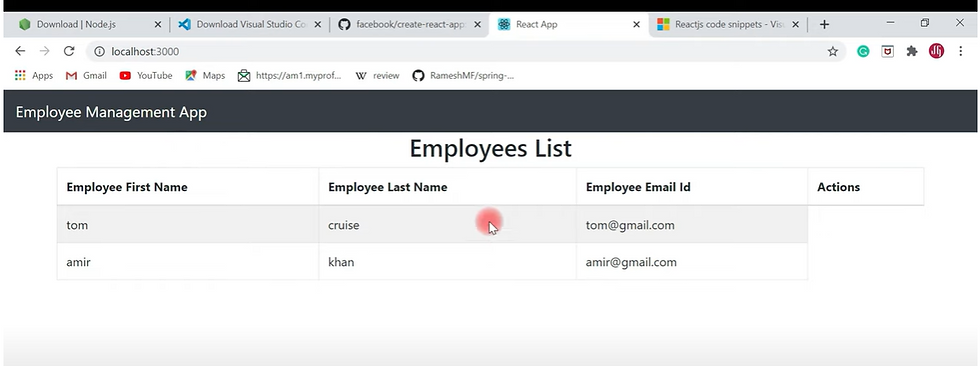
Configure Routing
Install React Router component with below command
npm install react-router-dom
Configure routing in App.js
App.js
use below import

we are importing browserrouter as router,route ,switch element from react-router-dom.switch element is used to ensure that one component render at a time.
include router tag in function App as below

define route path within switch as below

let us test route as below
hit http://localhost:3000/ or http://localhost:3000/employees in browser, router should take to listing page


Adding Add Employee route
create component/AddEmployeeComponent.jsx

Goto App.js and router for AddEmployee fucntion.This router object maintain history object for all routes defined.This is being passed to props obejct. so we make use of this.props.history.push('router path') to route to that component.

Edit ListEmployeeComponent to add a button for Add employee as below

Add eventhandling for Add Employee as below
this.addEmployee=this.addEmployee.bind(this);

In addEmployee(), we will goto add employee form, so we need to make use of routing as below

Since we have configured route in App.js, React router maintain a history object, that keeps mapping for all routing. React Router passes history objecy to each route as props. With this propes we can get access to history object and control routing mapping based on flow.
so we make use of this.props.history.push('/add-employee');
update createEmployeeComponent.jsx as below


Click Add Employee,employee form is displayed

Add employee Form
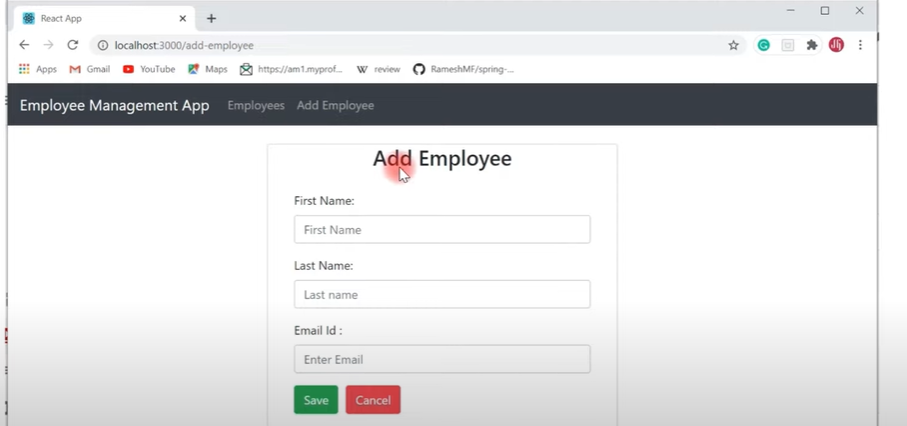

define properties in state so that we can capture values


Adding eventhandler for firstname as below



bind this eventhandling for save into contrcutor


click on cancel button - will take you to listing page

clikc on save, see console

Integrate rest endpoint for adding employee to DB
Goto EmployeeService.js and add call (createEmployee(employee) for adding employee to DB as below

Update CreateEmployeeComponent.jsx/saveEmployee method for adding rest api call for adding employee info to DB and then route it back to listing as below


create UpdateEmployeeComponent.jsx as below

update App.js for routing info to update component

Add update button ot listing page for updating employee as below


update service class to get a employee based on id as below

update employee page is same as create employee page,just update saveemployee with updateemployee and add updateemployee method.

update lifecycle method componentDId() as below


update data with update api
edit EmployeeService.js with update api call for restendpoint as below

Edit UpdateEmployeeComponent.jsx and include method updateEmployee as below
to integrate updateapi call.

click

click save and data is updated to db with api call
Ramesh is updated to Ram

Delete Data with delete api
Edit listing page and add delete button , bind eventhandler as below


add deleteemployee method as below to call rest api to delete records and filter deleted employee from employee array for performance rather than navigating to listing page again as below.


update EmployeeService.js with delete method as below


click on delete for employee amir

Conclusion
We have successfully created React Application - Employee Management and integrated with Employee Resource Endpoint.


Comments